Friday, October 4, 2019
Creative Mobile Photography #1
Mobile Photography #1
Hi Everyone, This is Daniel. In this video I'm gonna show you How to do the Slice Ball Freeze Frame Mobile Photography Trick
Subscribe us:
http://bit.ly/Subscribe-fandD

Thursday, September 26, 2019
How to Create Simple Ocean Animation in Blender 2.8
Blender Tutorial
Hi Everyone, This is Daniel, In this video I'm gonna show you How to Create a Simple Ocean Animation in Blender 2.8
Also Watch:
Water Text Animation: bit.ly/Water_text
Subscribe us:
http://bit.ly/Subscribe-fandD
Friday, August 30, 2019
Create Passport Size Photo in Free Software (GIMP) | #105
GIMP Tutorial #105
Hi Everyone, This is Daniel, In this video I'm gonna show you How to create the Passport Size Photo using the Free and Open Source Software called GIMP
Note:
GIMP is the perfect Alternative for Photoshop. Hence you can try this same method in Photoshop as well.
Also Watch:
Bidirectional Illusion face in GIMP - http://bit.ly/bidirection_face
Subscribe us:
http://bit.ly/Subscribe-fandD
#gimp #passportsizephoto #gimptutorial
Wednesday, August 21, 2019
How to Install Screencast Keys in Blender 2.8
Blender Tutorial
Hi Everyone, This is Daniel, In this video we are going to learn How to install screencast keys using the add-on called shortcut_VUr by Jayanam
Download Link : https://github.com/jayanam/shortcut_VUr
Subscribe us:
http://bit.ly/Subscribe-fandD
Wednesday, August 14, 2019
GIMP Tutorial - Bidirectional illusion face | Photoshop Alternative | #104
Hi Everyone, This is Daniel from f&D, In this video I'm gonna show you How to create Bidirectional Illusion Face Effect in GIMP
Note:
GIMP is the Perfect Alternative for Photoshop. Hence you can try this same method in Photoshop as well
Needed: 1. Straight looking Photo 2. Side looking Photo
Steps:
1. Open GIMP and drag and drop your Straight looking image
2. Remove Background
3. Add Side looking Image
4. Also Remove the Subject instead of background
5. Adjust the Side looking image infront of the Straight looking image to get the illusion effect
6. Grab Fuzzy Select Tool and Select the Transparent area of the Side looking Image
7. Add Layer Mask with Selection to the Straight looking Image
8. Add a Background
That's it.. This is way you can create the Bidirectional Illusion Face Effect.
Thanks for Watching
If you like this video, Give thumbs up and Subscribe this channel for more Future GIMP Tutorials
Also Watch:
How to create Rodilius(Fractalius) Effect in GIMP: http://bit.ly/rodilius_effect
Subscribe us:
http://bit.ly/Subscribe-fandD
Monday, August 12, 2019
Picsart - Map Face Effect
Picsart tutorial
Hi Everyone, This is Daniel, In this video I'm gonna show you How to create Map Double Exposure Effect using the free image editing app called Picsart
Also Watch:
Emoji Background in Picsart: http://bit.ly/emoji_background
Subscribe us:
http://bit.ly/Subscribe-fandD
Sunday, August 11, 2019
How to create Emoji Background Edit in Picsart
Picsart Tutorial
Hi Everyone, This is Daniel, In this video I'm gonna show you How to create Emoji Background Edit using the free image editing app called picsart
Also Watch:
Picsart Motion Effect: http://bit.ly/motion_effect
Subscribe us:
http://bit.ly/Subscribe-fandD
Friday, August 9, 2019
Picsart Motion Blur Effect
Picsart Tutorial
Hi Everyone, In this video tutorial, We are going to learn about How to create motion blur effect in Picsart
Also Watch:
Face Paint in Picsart : http://bit.ly/face_paint_picsart
Subscribe us:
http://bit.ly/Subscribe-fandD
Thursday, August 8, 2019
Picsart - Face Paint Tutorial | Independence Day Editing
Picsart Tutorial
Hi Everyone, In this video we are going to learn about How to face paint using the free image editing app called picsart.
Also Watch:
Picsart Draw Art Effect: http://bit.ly/draw_artt
Subscribe us:
http://bit.ly/Subscribe-fandD
Tuesday, August 6, 2019
Red and Teal RGB Split in Picsart | Glitch
Picsart Tutorial
Hi Everyone, This is Daniel, In this video, We are going to learn about How to create RGB Split in Red and Teal Color using the free image editing software called Picsart
Subscribe us:
http://bit.ly/Subscribe-fandD
Monday, August 5, 2019
Torn Paper Effect in Picsart | Picsart Image Editing
Picsart Tutorial
Hi Everyone, In this video, We are going to learn about How to create Torn paper effect using the free mobile editing app called Picsart
Torn paper image
Also Watch:
Paint Dripping effect in Picsart: http://bit.ly/paint_dripping
Subscribe us:
http://bit.ly/Subscribe-fandD
Subscribe to:
Posts (Atom)
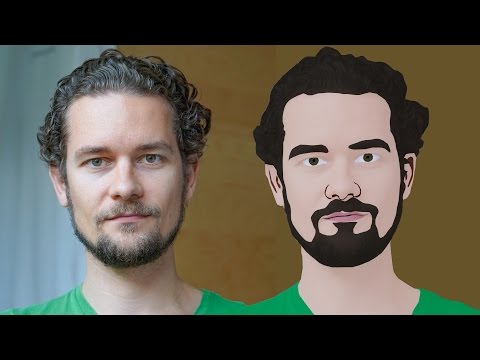
GIMP Cartoon Effect Tutorial
Hi Everyone, In this video I'm gonna show you How to create a Cartoon Version of Yourself or Someone using the Open Source Software...
-
Make your Image sing and vibe for a Song using an Android App Hi Everyone, This is Daniel from f&D. In this video, We are going to see ...
-
Spider-man Web Shooter Transition Tutorial using VN App | Spiderman Web Transition TikTok Trend | Instagram Trend Hi Everyone, In this vid...

