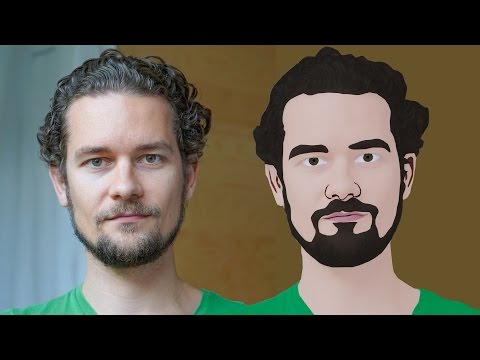
Hi Everyone, In this video, We are going to see How to create a Cartoon Version of yourself in just a click for free using an android app called ToonApp. This is the Android app and it is very easy and you don't any drawing skill. You can just select your photo and the app will convert it into a cartoon
Steps:
1. Go to Google Playstore
2. Install the App: https://play.google.com/store/apps/details?id=com.lyrebirdstudio.cartoon
3. Open it
4. Allow Toon App to Access your Photos from Gallery
5. Select your Photo
6. Adjust the Position and click on the tick icon in the top right corner
7. Add Background if you want
8. Save the Image
That's it.. Thanks for Watching
If you like this video give thumbs up and subscribe this channel
Also Watch:
GIMP Cartoon Effect: https://www.youtube.com/watch?v=PbtukN4o1Hw
Subscribe us:
http://bit.ly/Subscribe-fandD
Showing posts with label Picsart Tutorials. Show all posts
Showing posts with label Picsart Tutorials. Show all posts
Monday, March 1, 2021

Friday, July 5, 2019
Picsart Tutorial - VHS Glitch Effect || Picsart Image Editing
Hi guys, This is Daniel, In this video I'm gonna show you How to create VHS Glitch Effect using the Free Mobile App called Picsart
Picsart is the Free Image Editing App for Mobile Phones which is similar to Photoshop in PC. It is Available for both Android and iOS
Steps:
1. Open your Image in Picsart
2. Go to Add Photo and Add Same image with Default Colorize Filter and Change the Image blend mode to Lighten
3. Move the position of the Image to make it look like its glitching
4. Again add photo, this time with the same colorize effect but with the hue value to the maximum
5. Again position the Image to make it look like its glitching
6. Add the vhs glitch and overlay stickers from the picsart sticker library as shown in the video
7. Then add noise effect
That's it... Thanks for Watching.
If you like this video, Give thumbs up and Subscribe this channel for ore future Tutorials
Also Watch:
Water Ripple Effect: http://bit.ly/water-ripple-picsart
Subscribe us:
http://bit.ly/Subscribe-fandD
Tuesday, July 2, 2019
Water Effect in Picsart | Picsart Editing Tutorial | Picsart Photo Editing
Hi guys, This is Daniel, In this video I'm gonna show you How to create Water Text Effect using the Free Mobile App called Picsart
Picsart is the Free Image Editing App for Mobile Phones which is similar to Photoshop in PC. It is Available for both Android and iOS
Images Used : Man
Picsart App: Android || iOS
Also Watch:
Picsart Own Wall Editing : http://bit.ly/picsart-own-wallSubscribe us:
http://bit.ly/Subscribe-fandD
Sunday, June 30, 2019
Dual Lighting Portrait Effect - Picsart
Hi guys, This is Daniel, In this video I'm gonna show you How to create a Dual Lighting Effect using the Red and Blue Color in the Free Mobile App called Picsart
Picsart is the Free Image Editing App for Mobile Phones which is similar to Photoshop in PC. It is Available for both Android and iOS
Images Used : Man
Picsart App: Android || iOS
Also Watch:
Anime Shirt Effect: http://bit.ly/picsart_anme_shirt
Subscribe us:
http://bit.ly/Subscribe-fandD
Thursday, June 20, 2019
Anime Shirt Effect in Picsart
Hi guys, This is Daniel, In this video I'm gonna show you How to create a Anime Shirt Effect using the Free Mobile App called Picsart
Picsart is the Free Image Editing App for Mobile Phones which is similar to Photoshop in PC. It is Available for both Android and iOS
Picsart App: Android || iOS
Images Used : Girl
Subscribe us:
http://bit.ly/Subscribe-fandD
Creative Color Splash Effect in Picsart
Hi Guys, This is Daniel from f&D, In this video I'm gonna show you How to create Creative Color Splash Effect using the Free Mobile Editing App called Picsart
Picsart is the Free Image Editing App for Mobile Phones which is similar to Photoshop in PC. It is Available for both Android and iOS
Picsart App: Android || iOS
Images Used: Woman
Subscribe us:
http://bit.ly/Subscribe-fandD
Double Exposure Skycrapers Effect in Picsart
Hi Guys, This is Daniel from f&D, In this video I'm gonna show you How to create Double Exposure Effect (City) using the Mobile Editing App called Picsart
Picsart is the Free Image Editing App for Mobile Phones which is similar to Photoshop in PC. It is Available for both Android and iOS
Picsart App: Android || iOS
Images Used: Man || Skyscrapers
Creative Silhouette Effect in Picsart
Hi guys, This is Daniel, In this video I'm gonna show you How to create a Silhouette Effect and Blend it with the Background using the Smart Blur Effects in the Mobile App called Picsart
Image Used : Man || Silhouette Nature
Subscribe to:
Posts (Atom)
GIMP Cartoon Effect Tutorial
Hi Everyone, In this video I'm gonna show you How to create a Cartoon Version of Yourself or Someone using the Open Source Software...
-
Make your Image sing and vibe for a Song using an Android App Hi Everyone, This is Daniel from f&D. In this video, We are going to see ...
-
Photopea - Neon Text Effect Tutorial Hi Everyone, In this video I'm gonna show you How to make Neon Text Effect in Photopea. This phot...

