Hi Everyone, This is Daniel from f&D, In this video We are going to see How to make Pop Out Text Effect in GIMP. GIMP is the free Image Manipulation Software
Note:
GIMP is the perfect Alternative for Photoshop. Hence you can try this same method in Photoshop as well
Steps:
1. Create Text Layers in Separate Layers
2. Position the Text layers below or above
3. Scale the Text if Necessary
4. Make the Text Layer to Image Size
5. Add Drop Shadows to the Text Layers except the Bottom Text
That's it. Thanks for Watching
Also Watch:
GIMP Reflection: https://www.youtube.com/watch?v=Ab4m6...
Subscribe us:
http://bit.ly/Subscribe-fandD
Sunday, March 28, 2021

Wednesday, March 17, 2021
GIMP - Convert Image to Pixel Art | Pixel Effect | Photoshop Alternative
GIMP Tutorial - Pixel Art
Hi Everyone, This is Daniel, In this video I'm gonna show you How to Convert a Normal Image into a Pixel Art Image using the free and Open Source Software called GNU Image Manipulation Program abbreviated as GIMP
Note:
GIMP is the Perfect Alternative for Photoshop. Hence you can try this same method in Photoshop as well
Steps:
1. Open your Image in GIMP
2. Scale the Image to 100px
3. Select the Pencil and in the tools option change its hardness to 100% and size to 1 for pixel art
4. Add a Transparent Background and draw the outline and fill the color using color picker and bucket fill tool
5. Add Shadows and Highlights
6. Scale the Image back to its original size with interpolation 'none'
That's it. You just created your pixel art by converting the normal image
Thanks for Watching
Also Watch:
GIMP Cartoon Effect: https://www.youtube.com/watch?v=PbtukN4o1Hw
Subscribe us:
http://bit.ly/Subscribe-fandD
Monday, March 1, 2021
Create a Cartoon Version of Yourself in just a click | ToonApp #Shorts
Hi Everyone, In this video, We are going to see How to create a Cartoon Version of yourself in just a click for free using an android app called ToonApp. This is the Android app and it is very easy and you don't any drawing skill. You can just select your photo and the app will convert it into a cartoon
Steps:
1. Go to Google Playstore
2. Install the App: https://play.google.com/store/apps/details?id=com.lyrebirdstudio.cartoon
3. Open it
4. Allow Toon App to Access your Photos from Gallery
5. Select your Photo
6. Adjust the Position and click on the tick icon in the top right corner
7. Add Background if you want
8. Save the Image
That's it.. Thanks for Watching
If you like this video give thumbs up and subscribe this channel
Also Watch:
GIMP Cartoon Effect: https://www.youtube.com/watch?v=PbtukN4o1Hw
Subscribe us:
http://bit.ly/Subscribe-fandD
Tuesday, February 9, 2021
GIMP Tutorial - Convert Normal Art to Pixel Art
GIMP Tutorial #110
Hi Everyone, This is Daniel, In this video We are going to see How to convert a Normal Art into the Pixel Art using the Open Source Image Editing Software called GIMP
Note:
GIMP is the free Alternative to Photoshop. Hence you can try this same method in Photoshop as well
Steps:
1. Open your Normal art into GIMP
2. Scale the Image down to 100 px and resolution to 72 px
3. Add a New Transparent layer and draw the Outline using the pencil tool with 1 px size and hardness of 100%
4. Fill the colors using bucket fill tool
5. Add another transparent layer and draw shadow on it
6. Add another transparent layer and draw highlights on it
7. Scale back to the original size with the interpolation none
That's it.. Thanks for Watching
Also Watch:
GIMP Line Art: https://youtu.be/xjj_X0uJOFk
Subscribe us:
http://bit.ly/Subscribe-fandD
Sunday, September 13, 2020
GIMP tutorial – Creating Space Artwork | GIMP 2.10 tutorial
GIMP Tutorial #108
Hi Everyone, In this video I'm going to do Space Artwork in GIMP from Scratch
GIMP tutorial - Creating space artwork | GIMP 2.10 tutorial. This is our fourth GIMP tutorial this year. GIMP 2.10 is used in this video. In this video I will be creating space artwork from scratch in GIMP 2.10.
This tutorial will be easy to follow for both beginners as well as for advanced users too and this tutorial assumes that the viewer is absolute beginner in GIMP 2.10 however knowledge about GIMP basics will make it easier for you to understand and follow the video.
GIMP 2.10 has great advanced features than previous versions of GIMP. GIMP is not only used in editing images but can also be used to create artwork like the one in the video.
If you’re learning editing then GIMP is a must learn free open source application. Still in 2020 GIMP is a great alternative for photoshop. If you a beginner and if you want to learn about GIMP artwork then this video is for you.
Download the Project File here: https://gumroad.com/l/prVfE
Note:
GIMP is the perfect Alternative for Photoshop. Hence you can try this same method in Photoshop as well.
Steps:
1. Open GIMP
2. Create Sky Background
3. Add Stars and Supernovas
4. Then create different types of Planet and place it in the project
5. Place the Rocket Image in the Project : https://pixabay.com/vectors/rocket-space-ship-space-launch-312767/
6. Add the Rocket Smoke
7. Add the Shooting Star in the Space
That's it.
Thanks for Watching
Also Watch:
GIMP Lineart: https://youtu.be/xjj_X0uJOFk
Subscribe us:
http://bit.ly/Subscribe-fandD
Wednesday, September 2, 2020
GIMP Line Art tutorial for beginners 2020 | GIMP 2.10 tutorial for begin...
GIMP Tutorial #107 - Line Art
Hi Everyone, This is Daniel, In this video we are going to see How to make Line Art in GIMP.
GIMP line art tutorial for beginners 2020 | GIMP 2.10 Tutorial. This is our third video in about GIMP 2020. Line art is one of the most creative and easy editing style in GIMP 2.10. This GIMP tutorial for beginners shows that GIMP 2.10 is a great tool to create stunning line art.
This tutorial is for beginners (GIMP Basics) also intermediate and pro GIMP users and the version of GIMP used in this video is 2.10. GIMP in 2020 is still the best alternative for photoshop.
This tutorial will also help beginners to create cool line art from images. GIMP 2.10 contains advanced features like MyPaint Brush tool which makes it easy to create Line art in GIMP. If you are learning editing then you must learn how to create line art in GIMP 2.10. With GIMP 2.10 you can line art from image very easily.
This tutorial will be easy to follow for both beginners as well as for advanced users too. GIMP 2.10 is easy to use and it’s a great alternative for photoshop. So if you want to learn GIMP line art then this beginner tutorial is for you And in this tutorial I have used wacom tablet to draw the Line Art.
How to Set Up Wacom Tablet in GIMP - https://youtu.be/Xypw50ueWRk
This Tutorial is done using Wacom Tablet. If you want to make Line Art using Mouse, Comment in the Comment box, If I get more comments I will make one.
Note:
GIMP is the perfect alternative for photoshop. Hence you can try this same method in Photoshop as well.
Steps:
1. Open your Image in GIMP
2. Add a New Transparent Layer
3. Select MyPaint Brush Tool
4. Draw your Line art as shown in the video
5. Add Shadows on new layer
That's it.
Thanks for Watching
Also Watch:
GIMP Cartoon Effect: https://youtu.be/PbtukN4o1Hw
Subscribe us:
http://bit.ly/Subscribe-fandD
Monday, July 27, 2020
How to record screen on windows 10 WITH WEBCAM using OBS
This is Daniel and in this video you’ll learn How to record screen on windows 10 WITH WEBCAM using OBS. There are so many ways to record screen on windows 10 but do you know that there is a free software to record screen on windows 10.
One of the most frequently asked question is how to record screen with OBS & I’ll show you how to do that. sometimes you may have to record both screen and webcam in such case this method will be very helpful OBS.
By changing few things you’ll be able to record webcam and screen at the same time and in this video (I have also covered how to record your computer screen and webcam both simultaneously). And by the way the free software which I am using in this video is OBS studio (available for Mac, Windows, & Linux).
When you want to record screen on windows 10 there are many paid software’s but OBS is a open source software to record PC screen in windows 10 with webcam. So, if you want to know how to record screen on windows 10 with webcam using OBS then follow this video.
Steps:
1. Install the OBS Software - https://obsproject.com/download
2. Open the OBS
3. In the Source TAB add Desktop Source to Record the Screen of your Computer
4. Then Add Video Capture Device Source
5. In that Select your Webcam, This will capture your Webcam
5. Adjust the Settings like FPS etc
6. Transform the Size of the Webcam
That's it.
Thanks for Watching
Also Watch:
Record PC Screen OBS: https://youtu.be/zKLmng5uOHw
Subscribe us:
http://bit.ly/Subscribe-fandD
Wednesday, April 29, 2020
How to Record your Screen in Windows 10 for Free using OBS
Hi Everyone, In this video I'm gonna show you How to record your PC Screen in Windows 10 or any other operating system using the free software called OBS: Open Broadcaster Software.
Steps:
1. Download OBS: https://obsproject.com/
2. Install it
3. Make the Settings suitable for Recording
4. Change format, resolution and add shortcut keys if you need
5. Add Display Capture
6. Fit it to Screen
7. Add audio capture if you are going to record
8. Start Recording and Stop Recording
9. Open the folder which the video recorded and you will be seeing the recorded screen of your PC.
That's it. Thanks for Watching
Also Watch:
OBS Black Screen FIX: https://www.youtube.com/watch?v=Cpx39JwLoR0
Subscribe us:
http://bit.ly/Subscribe-fandD
Sunday, April 19, 2020
Toxic Picsart Editing | Picsart Editing Tutorial
Picsart Tutorial
Hi Everyone, In this video I'm gonna show you How to create Toxic Picsart Editing. Picsart is the free Image Editing app for Android and iOS. This New style of Editing starts to trend after Vijay Mahar posting this kind of Editing in Instagram.
Also Watch:
Map Face in Picsart: https://youtu.be/W9W0nEYRWDI
Subscribe us:
http://bit.ly/Subscribe-fandD
#picsart #toxicediting #picsartediting
Wednesday, April 8, 2020
GIMP Tutorial - Circle Pop Out Effect | GIMP Photo Editing | #106
GIMP Tutorial #106
Hi Everyone, This is Daniel, In this video I'm gonna show you How to create Circle Pop Out using the Free and Open Source Software called GIMP
Note:
GIMP is the perfect Alternative for Photoshop. Hence you can try this same method in Photoshop as well.
Images:
Galaxy
Background
Steps:
1. Create a New Image of 1920*1080 px
2. Drag and Drop your Image
3. Remove the Background
4. Add a Circle and Layer mask the Galaxy Image into it
5. Make the Subject Image Pop Out by erasing the outside pixels
6. Add a Background
That's it
Subscribe us:
http://bit.ly/Subscribe-fandD
Friday, October 4, 2019
Creative Mobile Photography #1
Mobile Photography #1
Hi Everyone, This is Daniel. In this video I'm gonna show you How to do the Slice Ball Freeze Frame Mobile Photography Trick
Subscribe us:
http://bit.ly/Subscribe-fandD
Subscribe to:
Posts (Atom)
GIMP Cartoon Effect Tutorial
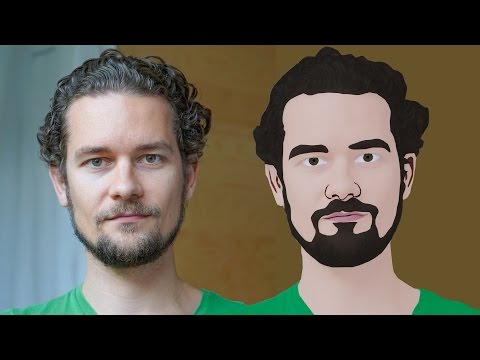
Hi Everyone, In this video I'm gonna show you How to create a Cartoon Version of Yourself or Someone using the Open Source Software...
-
Make your Image sing and vibe for a Song using an Android App Hi Everyone, This is Daniel from f&D. In this video, We are going to see ...
-
Spider-man Web Shooter Transition Tutorial using VN App | Spiderman Web Transition TikTok Trend | Instagram Trend Hi Everyone, In this vid...

