Make your Image sing and vibe for a Song using an Android App
Hi Everyone, This is Daniel from f&D. In this video, We are going to see How to make your Face in the images sing a song using an Android app called Face Dance.
App Link: Face Dance
Open Playstore and search for Face Dance. Install it. After Installing open the Face Dance app to make your Photos Sing.
Add a Photo and select any one of the song from the app and select your photo or any celebrity photo from the app and click on make it dance.
Now wait for some time and the app will make your Photos sing.
Thanks for Watching.
Also Watch
Photo Singing App old video: https://www.youtube.com/watch?v=pMZcZJGk9UE
Subscribe us:
http://bit.ly/Subscribe-fandD
Wednesday, February 7, 2024

Friday, January 26, 2024
Make your Bad Audio Recordings to PROFESSIONAL AUDIOS
Remove Background noise, Echo, Static noise from your Audio using Adobe Podcast AI
Hi Everyone, This is Daniel from f&D. In this video, We are going to see How to convert normal recording that you are recorded using your mobile phone or cheapest mic into professional ones using an AI called Adobe Podcast.
Adobe Podcast
00:00 About
00:12 Intro
00:20 Adobe Podcast
00:43 Enhance Speech
02:12 Thanks Note
Also Watch:
Convert Normal Images into Anime - https://www.youtube.com/watch?v=EquGUkr1oBw
Subscribe us:
http://bit.ly/Subscribe-fandD
Wednesday, January 24, 2024
Convert your Normal Photos into Amazing ANIME IMAGES | Stylar AI
How to convert your Normal Images into Anime Style Images using Stylar AI
Hi Everyone, This is Daniel form f&D. In this video, We are going to see How to convert your Normal photos into Anime Style Images using an AI called Stylar using different styles called Ethereal Enchantments and Impasto Comics.
Stylar AI
00:00 About
00:10 Intro
00:17 Stylar AI
01:17 Anime Styles
01:29 Ethereal Enchantments Anime Style
04:40 Impasto Comics Anime Style
06:13 Conclusion
06:21 Thanks Note
Thanks for Watching
Also Watch
Normal 2D Images to 3D Animations: https://youtu.be/tdTH85v01Ew
Subscribe us:
http://bit.ly/Subscribe-fandD
Wednesday, January 10, 2024
Convert Normal 2D Images to 3D Animations | Leiapix | Depth Animation
Convert images to 3D for FREE using Depth Maps
Hi Everyone, This is Daniel from f&D. In this video, We are going to see How to create 3D Animations from normal 2D Images using Leiapix with the help of Depth Maps
Website link - https://www.leiapix.com/
00:00 About
00:12 Channel Intro
00:19 Leiapix
00:52 2D Image Upload
01:35 Leiapix features
03:39 Uploading another Image
03:54 How Depth Map Works
04:13 Download
04:56 Conclusion and Thanks Note
Also Watch
Playground AI Beginner full tutorial - https://youtu.be/Az84_Hi4nXA
Subscribe us:
http://bit.ly/Subscribe-fandD
Monday, January 8, 2024
Create Trending Instagram and Social Media AI Images
Create Social Media AI Images - Instagram, YouTube, Tiktok, Whatsapp Trending
Hi Everyone, This is Daniel from f&D. In this video, we are going to see How to generate a 3d character sitting on the social media logo with his social media backdrop using bing ai image creator.
Prompts - https://bit.ly/aisocmediaprompts
00:00 About
00:13 Intro
00:20 Bing App
00:47 Prompt
01:33 Create the Images
02:18 Tweak the prompts
04:02 Download Images
04:08 Thanks Note
Also Watch:
Infinite AI Animations from Photo - https://youtu.be/9ftz3miWUe0
Subscribe us:
http://bit.ly/Subscribe-fandD
Thursday, January 4, 2024
Make your Short Prompts to create Wonderful Images | AI Images | Stable ...
Enhance prompt using Playground AI
Hi Everyone, This is Daniel from f&D. In this video, We are going to see How to enhance prompts using Playground AI to get better AI Images.
00:00 About
00:13 Intro
00:22 Playground AI
00:28 Image generation without Enhancing
01:15 Image generation with Enhancement
02:29 Copy Prompts
03:22 Conclusion
Thanks for Watching
Also Watch:
Consistent Character in Playground AI - https://youtu.be/rxqY07IhHCA
Subscribe us:
http://bit.ly/Subscribe-fandD
Friday, August 11, 2023
AI Video Generator from Image and Text | Runway ML | Gen-2
How to Create AI Videos using Runway ML
Hi Everyone, This is Daniel. In this video, We are going to see How to create AI Videos using Runway ML, Gen 2. There are three different modes to generate AI video. Those are Text to AI Video, Image to AI Video, Generating AI Video using both text and image.
Website Link: Runway ML
00:00 About Runway ML
00:16 Intro
00:23 Plans
00:48 Home page
01:04 Three modes to create AI Video
02:18 Text to AI Video
03:42 Image to AI Video
04:47 AI Video from both Image and Text
06:47 Conclusion
Thanks for Watching.
Also Watch
SDXL 1.0 Online: https://youtu.be/b7gIkO-dnK4
Subscribe us:
http://bit.ly/Subscribe-fandD
Friday, August 4, 2023
Use Stable Diffusion SDXL 1.0 Online for FREE | 2 Methods
SDXL 1.0 in Online using 2 Methods
Hi Everyone, This is Daniel from f&D, In this video, We are going to see How to use SDXL 1.0 Online using 2 different methods. One is using Clipdrop and another one is using Playground AI
Website Links:
00:00 About SDXL 1.0
00:27 Intro
00:35 Using Clipdrop
03:35 Using Playground AI
06:48 Ending
Thanks for Watching
Also Watch:
Consistent Character in Stable Diffusion: https://youtu.be/rxqY07IhHCA
Subscribe us:
http://bit.ly/Subscribe-fandD
Saturday, July 22, 2023
How to Expand Photo using Clipdrop | Extend Background
Extend Images using Clipdrop
Hi Everyone, This is Daniel from f&D. In this video, We are going to see How to extend images using clipdrop. Using this you can change portrait images to landscape and vice verse also you can change the size to square ratio.
This uncrop tool can helps to post your images on instagram without any cropping.
Website link: Clipdrop
Steps
00:00 About
00:08 Intro
00:16 Uncrop using clipdrop
00:48 Upload Images
00:59 Maximum Size
01:18 Extend Image
01:52 Clear Imperfections
02:43 Extend AI Image
03:17 Additional Generation
03:40 Conclusion
03:50 Outro
Thanks for Watching
Also Watch:
SDXL 0.9 in Clipdrop: https://youtu.be/Z2B1v5tiiUM
Subscribe us:
http://bit.ly/Subscribe-fandD
Saturday, July 15, 2023
How to Remove Background in Seconds using Clipdrop
Remove Background from Photo using Clipdrop
Hi Everyone, This is Daniel from f&D. In this video, We are going to see How to Remove Background of the Image using Clipdrop by Stability AI. If you purchase pro version you can remove background in bulk upto 10 images in one go.
Website: Clipdrop
Also Watch:
SDXL 0.9 in Clipdrop - https://youtu.be/Z2B1v5tiiUM
Subscribe us:
http://bit.ly/Subscribe-fandD
How to use Stable Diffusion XL 0.9 using Clipdrop for FREE | SDXL 0.9
SDXL 0.9 in Clipdrop
Hi Everyone, This is Daniel from f&D. In this video, We are going to see How to use SDXL 0.9 using Clipdrop by Stability AI. This is the Stable Diffusion's new model that gives great results in the ai generated images.
Website: Clipdrop
00:00 About
00:08 Intro
00:15 Website
00:26 Pricing
00:44 How to use SDXL 0.9
03:27 Conclusion
03:38 Outro
Thanks for Watching
Also Watch:
Give Instruction to Edit Images in Playground AI - https://youtu.be/1Oe3Ew-C76E
Subscribe us:
http://bit.ly/Subscribe-fandD
Thursday, July 13, 2023
Easy Image Editing with Playground AI | Generative Fill Alternative
Give Instruction to Edit Images in Playground AI
Hi Everyone, This is Daniel from f&D. In this video, We are going to see How to Edit your Images by just giving instructions using Playground AI. Using this you can tell the Playground AI what to edit, add, replace or modify by just adding instructions. This can be used as the alternative for Generative Fill of Photoshop.
Website: Playground AI
Steps:
00:00 About
00:13 Intro
00:20 Playground AI
00:25 Import Image
00:43 Basic Features
01:20 Instructions to Edit
02:50 Add Masking to Edit
05:17 Edit AI Generated Images
05:41 Conclusion
05:48 Outro
That's it. Thanks for Watching
Also Watch
Consistent Character in Playground AI - https://youtu.be/rxqY07IhHCA
Subscribe us:
http://bit.ly/Subscribe-fandD
Thursday, July 6, 2023
Create Consistent Characters in Stable Diffusion - Playground AI
Consistent Character in Playground AI
Hi Everyone, This is Daniel from f&D. In this video, We are going to see How to create Consistent Character in Stable diffusion using Playground AI. This one can be created using the very simple trick by that you can create consistent characters.
Website used:
Steps:
00:00 About
00:09 Intro
00:17 Random Character
00:53 Random Name Generator
01:36 Create Consistent Character
04:05 Community Prompts
05:08 Conclusion
Thanks for Watching
Also Watch:
Playground AI Complete Beginner Tutorial - https://youtu.be/Az84_Hi4nXA
Subscribe us:
http://bit.ly/Subscribe-fandD
Thursday, June 15, 2023
Playground AI Complete Beginner Tutorial | Free Midjourney Alternative
Playground AI Basic Tutorial | Stable Diffusion | Free AI Image Generator
Hi Everyone, This is Daniel from f&D. In this video, We are going to How to use Playground AI. This is the complete basic tutorial on Playground AI. Playground AI is the ai image generating website, where you can generate AI images upto 1000 per day for free using the stable diffusion 1.5, stable diffusion 2.1 and playground v1 models. You can also generate images using DALL-E 2 model in paid version. Playground AI is the free Alternative for Midjourney.
Playground AI
Steps:
00:00 About
00:15 Intro
00:22 Playground AI
01:25 User Interface
02:29 Prompt
02:50 Filters
03:43 Negative Prompts
04:35 Image to Image
05:53 Models
06:59 Image Sizes
07:38 Prompt Guidance
08:21 Quality & Details
08:47 Seed
09:44 Samplers
11:49 Number of Images
12:24 Reference from Community
14:22 Post Generation
15:24 Profile
16:08 Conclusion
16:24 Outro
Thanks for Watching. Hope you learnt How to use Playground AI to generate AI Art for Free.
Also Watch:
How to use Stable Diffusion in Colab Easy: https://youtu.be/2RDVlPuHM_Y
Subscribe us:
http://bit.ly/Subscribe-fandD
Friday, June 9, 2023
Use Stable Diffusion in Google Colab (EASY)
How to use Stable Diffusion with Google Colab in easy method
Hi Everyone, This is Daniel from f&D. In this video, We are going to see How to run stable diffusion in Google Colab. This is simple video on How to generate AI Images using Stable Diffusion Colab Notebook.
Stable Diffusion Colab
Steps:
00:00 About Stable Diffusion in Colab
00:10 Intro
00:17 Login to Google Drive
00:21 Stable Diffusion Colab Notebook
00:27 Copy to Drive
00:32 Runtime type
00:41 Run Cells
01:18 Adding Prompts
02:05 Generate Images
02:34 Save Generated Images
02:45 Additional Steps
03:08 Conclusion
03:17 Outro
Thanks for Watching
Also Watch:
Create INFINITE AI ANIMATIONS from Photo - https://youtu.be/9ftz3miWUe0
Subscribe us:
http://bit.ly/Subscribe-fandD
Sunday, May 28, 2023
How to Blend Images in Midjourney | Blend and Imagine Command
Blend Images in Midjourney using Blend Command and Imagine Command
Hi Everyone, This is Daniel from f&D. In this video, We are going to see How to use Blend feature and Imagine feature to blend two or more images and generate ai images. Blend command is very useful to blend two images but imagine command can be used to blend more than 2 images.
Steps:
00:00 Blend Images in Midjourney
00:22 Intro
00:29 Blend command features
00:39 Blend two images with blend
01:24 Blend two images using Imagine
01:48 Comparison
01:56 Blending 5 Images
02:58 Blending 4 Images
03:27 Imagine command with prompts
05:32 Different Art Styles
06:55 Conclusion
07:34 Outro
Thanks for Watching
Also Watch:
Describe Command - https://youtu.be/XRgcYIcRzh0
Subscribe us:
http://bit.ly/Subscribe-fandD
Tuesday, May 16, 2023
Create INFINITE AI ANIMATIONS from Photo | Instagram Tiktok Trend
Genmo - Instagram Tiktok Reel AI Infinite Animation Tutorial | Stable Diffusion Deforum Alternative
Hi Everyone, This is Daniel from f&D. In this video, We are going to see How to create AI Animations from a Photo using the website called Genmo. Usually this tiktok and instagram trending AI Animation are made using the Stable Diffusion Deforum Extension. Also there is the website called kaiber ai but it is paid and the genmo is free and have enough credits for a day.
Steps:
00:00 Genmo Tutorial
00:20 Intro
00:27 genmo.ai
00:43 Creating the first frame of the video
02:24 Adding Prompts for AI Animation
02:51 Download the AI Video
03:07 Repeat the Process
04:54 Genmo Modes
05:18 Video Duration
05:28 Genmo Watermark
05:36 Merge the AI Generated Videos
05:57 Conclusion
06:04 Outro
Thanks for Watching.
Also Watch
Free Midjourney V5 Alternative - https://youtu.be/AG_dHqSDs9Y
Subscribe us:
http://bit.ly/Subscribe-fandD
Tuesday, May 2, 2023
Get the Perfect Prompt for Your Images with Midjourney's Describe Feature
How to use /describe command in Midjourney
Hi Everyone, This is Daniel from f&D. In this video, We are going to see How to use Describe Feature in Midjourney. Simply upload your image using describe commant and let Midjourney provide the perfect prompt for stunning results. Midjourney will give 4 prompts for the given image and you can use those as it is or you can change the prompts. So basically used to reverse enginneer the prompts.
Steps:
00:00 About /describe command
00:17 Intro
00:25 How to use Describe feature
01:13 How to use the prompts from describe
02:33 Use Describe for photography
05:13 For Interiors and Art Styles
06:21 Conclusion
06:37 Outro
Thanks for Watching.
Also Watch:
Upscale AI Images: https://youtu.be/1uFddBCjgGU
Subscribe us:
http://bit.ly/Subscribe-fandD
Monday, April 24, 2023
Upscale AI Images | 2 Methods
How to Upscale AI Images using 2 Methods
Hi Everyone, This is Daniel from f&D. In this video, We are going to see How to upscale AI Images or any Images using 2 different methods. One using ruDALL-E and another one is using upscale media. ruDALL-E can scale upto 8x but upscale media only upto 4x but it can enhance your image additionally.
Upscale Website Links:
Steps:
00:00 Upscale Images Introduction
00:11 Intro
00:18 ruDALL-E Upscale
01:33 Upscale Media
03:02 Outro
Also Watch:
Invite Midjourney Bot to your Server: https://youtu.be/Zwo9f_RAoZU
Subscribe us:
http://bit.ly/Subscribe-fandD
Sunday, April 16, 2023
How to Invite the Midjourney Bot to your Discord Server | Add Midjourney...
Invite Midjourney Bot to your Server
Hi Everyone, This is Daniel from f&D. In this video, We are going to see How to Invite Midjourney Bot to your discord server.
Steps
00:00 About
00:08 Intro
00:15 Create a Server
00:46 Add Midjourney Bot
01:29 Trying Prompts in Server
01:54 Outro
Thanks for Watching
Also Watch:
Buy Subscription on Midjourney: https://youtu.be/A5z20A9nbIo
Subscribe us:
http://bit.ly/Subscribe-fandD
Subscribe to:
Posts (Atom)
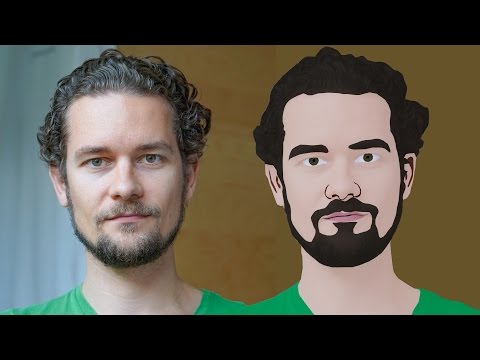
GIMP Cartoon Effect Tutorial
Hi Everyone, In this video I'm gonna show you How to create a Cartoon Version of Yourself or Someone using the Open Source Software...
-
Make your Image sing and vibe for a Song using an Android App Hi Everyone, This is Daniel from f&D. In this video, We are going to see ...
-
Spider-man Web Shooter Transition Tutorial using VN App | Spiderman Web Transition TikTok Trend | Instagram Trend Hi Everyone, In this vid...

